
Thumble Review: Features, Pricing, OTOs and Is It Right for You?
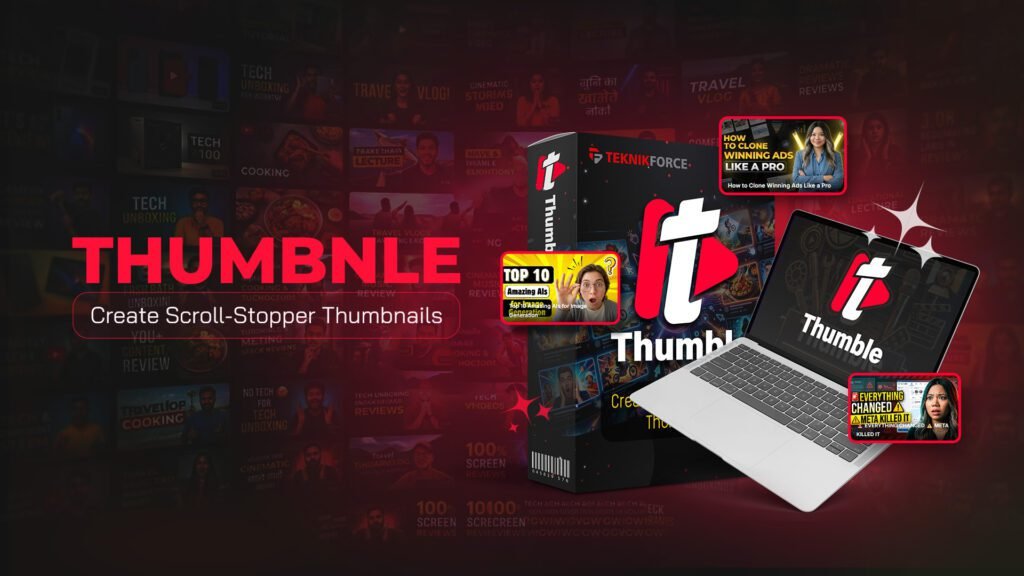
Thumble is an AI-powered thumbnail creator designed for people who want to produce attention-grabbing video thumbnails without starting every design from scratch. It combines AI generation, editable designs, branding tools, and multiple thumbnail variations in one web-based platform.
This independent Thumble review covers how the product works, its main features, pricing, optional upgrades, All-Inclusive Deal, benefits, and limitations. The goal is to help you decide whether it fits your content workflow before you visit the official website.
Thumble Product Overview
| Product detail | Information |
|---|---|
| Product name | Thumble |
| Also known as | Thumble AI |
| Product type | AI thumbnail generator and editor |
| Main purpose | Creating thumbnails for video content |
| Delivery | Web-based application |
| Developer | Teknikforce Ventures LLC |
| Vendor | Cyril Gupta |
| Entry-level product | Thumble Elite |
| Front-end price | $37 |
| All-Inclusive price | $189 |
| Refund period | 30 days |
| Guarantee | 100% money-back guarantee |
| Commercial use | Available through Thumble Pro or All-Inclusive |
| Best suited for | Creators, marketers, businesses and agencies |
What Is Thumble?

Thumble is a web-based AI thumbnail creator that helps users generate and edit thumbnails for YouTube and other video platforms. It is designed for creators, influencers, marketers, agencies, and businesses that want to produce thumbnail concepts without building every design manually.
Users can start with a video topic or a simple idea, and Thumble uses AI to create a matching thumbnail. They can also browse the included design library, customize an existing layout, import a thumbnail for editing, or generate several variations for the same video.
The platform supports faces, logos, brand graphics, portrait layouts, and standard landscape thumbnails. This makes it suitable for regular YouTube videos, Shorts, promotional content, and other video formats.
Thumble is intended to make thumbnail production faster and more accessible, particularly for users without advanced graphic-design experience. However, it does not remove the need for human review. AI-generated text, images, and layouts should always be checked before publication.
It is also important to separate the product’s purpose from its marketing claims. Thumble can help create and test different thumbnail ideas, but it cannot guarantee more clicks, views, subscribers, sales, or revenue.
How Does Thumble Work?
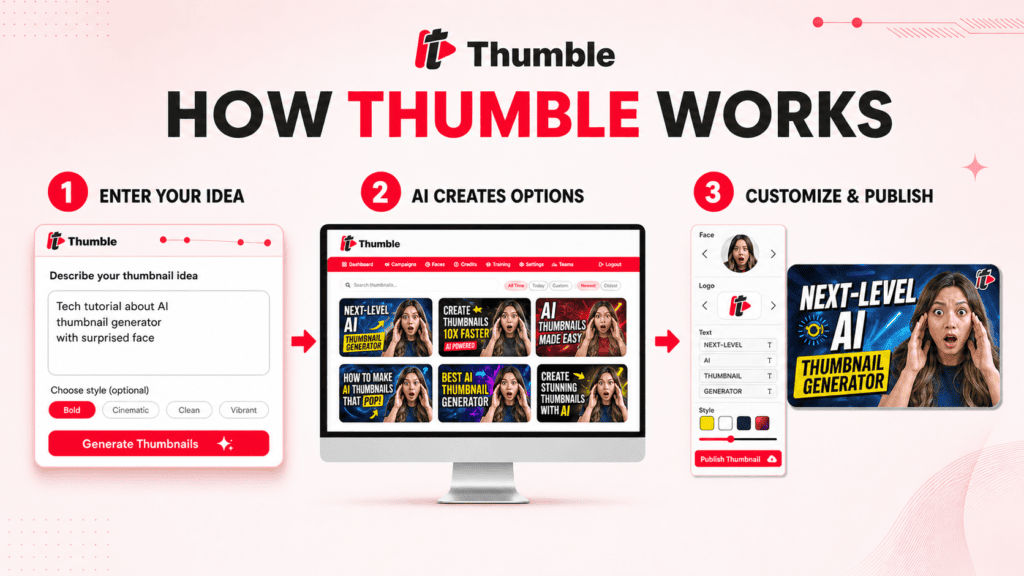
The Thumble workflow is intended to be accessible to users without advanced design experience.
1. Start with a topic or idea
You can provide a basic description of your video or the type of thumbnail you want. According to the product materials, a long or highly technical prompt is not required.
2. Generate a thumbnail concept
The AI uses your input to create a visual concept. You can then review the output and decide whether it fits the video.
3. Use a design for inspiration
Thumble includes a library of thumbnail designs. Instead of beginning with a blank page, you can choose a relevant style and adapt it to your own subject.
4. Customize the design
Users can adjust the design and add elements such as faces, logos, text, and other graphics. Existing thumbnails can also be imported for AI-assisted editing.
5. Create multiple variations
You are not limited to a single concept. Thumble can help produce different versions and creative angles for the same video.
6. Organize thumbnail campaigns
Campaign features are intended to help users keep related designs and variations together. Usage limits depend on the selected plan and available credits.
A thumbnail generated by AI should still be reviewed before publication. Check that the text is accurate, the visual hierarchy is clear, and the design remains readable when displayed at a small size.
For a closer look at the workflow, visit our complete guide to Thumble features.
Main Thumble Features
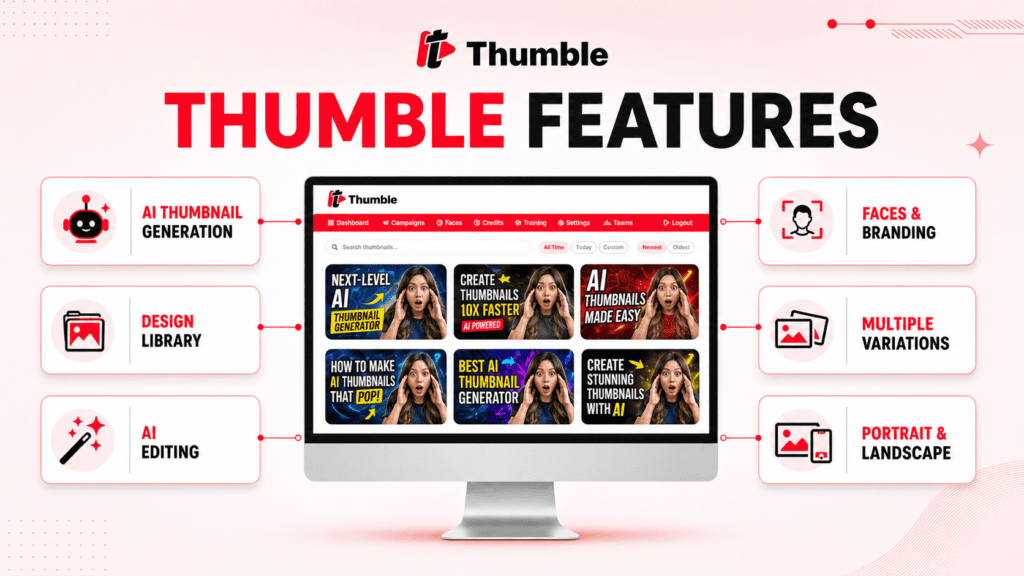
The platform brings together AI generation, editing, design inspiration, and branding features.
| Feature | What it does | Why it may be useful |
| AI thumbnail generation | Creates designs from a topic or idea | Reduces the need to begin from scratch |
| Design library | Provides existing styles and layouts | Helps users explore different creative directions |
| AI editing | Modifies a generated or imported thumbnail | Makes it easier to rework an existing concept |
| Multiple variations | Produces alternative versions | Helps creators compare different approaches |
| Face importing | Places a user or subject in a design | Useful for creator-led channels |
| Logo and graphic uploads | Adds branding elements | Supports business and client projects |
| Portrait layouts | Creates designs for vertical content | Useful for Shorts and other short-form platforms |
| Landscape layouts | Creates standard video thumbnails | Suitable for regular YouTube videos |
| Multilingual support | Supports content for different regions | Useful for international channels |
| Campaign organization | Groups thumbnail projects | Helps manage multiple videos or clients |
| Multiple AI options | Offers different generation choices | Broader access is available in higher plans |
| Commercial license | Permits client-service work | Included with Pro or All-Inclusive |
| Team access | Supports collaborative use | Listed as a Thumble Pro feature |
| Reseller option | Allows eligible buyers to sell licenses | Intended for software resellers |
Thumble Pricing Summary
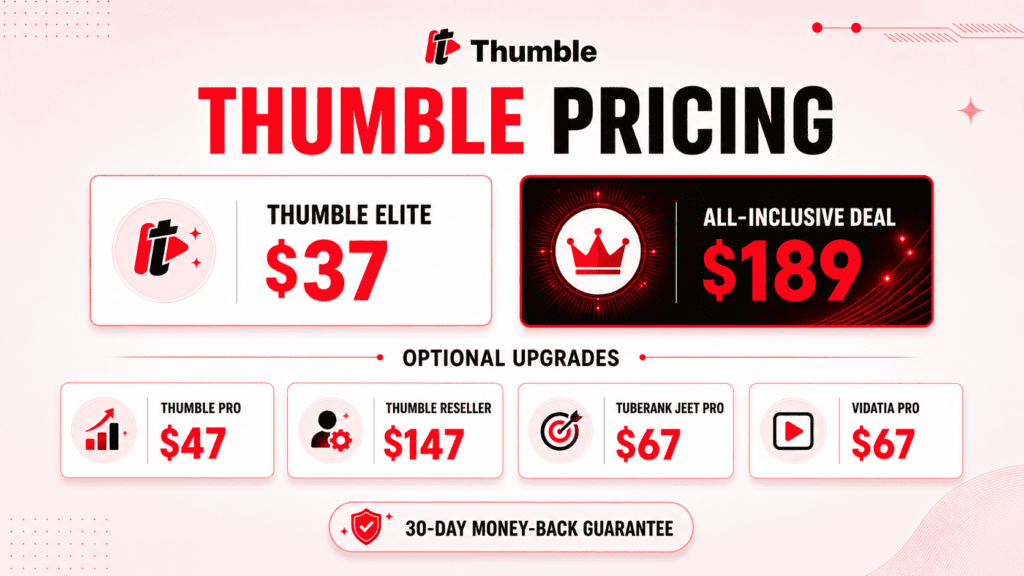
The entry-level version, Thumble Elite, costs $37.
The complete funnel includes four main OTOs, an additional reseller offer, three order bumps, and an All-Inclusive Deal.
| Offer | Price | Primary purpose |
| Thumble Elite | $37 | Core thumbnail generator for personal use |
| Thumble Pro | $47 | Commercial rights, higher limits and additional features |
| Thumble Reseller | $147 | Reseller rights and customer licenses |
| Tuberank Jeet Pro | $67 | YouTube SEO tools |
| Vidatia Pro | $67 | AI faceless-video creation |
| 140 extra reseller licenses | $99 | Expands reseller capacity |
| 50,000 additional credits | $44 | Adds more AI-generation credits |
| Unlimited daily thumbnails | $14 | Removes the standard daily thumbnail limit |
| Seller’s Pack | $29 | Additional selling resources |
| All-Inclusive Deal | $189 | Bundled access to the main funnel offers |
These prices make it possible to choose between buying only the thumbnail tool, adding a specific upgrade, or selecting the complete bundle.
Visit our dedicated Thumble pricing page for a detailed explanation of each purchase option.
Thumble money-back guarantee
Thumble comes with a 30-day, 100% money-back guarantee.
This gives buyers 30 days to use the product and decide whether it meets their needs. Refund requests should be made through the official vendor’s support channels within the guarantee period.
Thumble OTO Summary
An OTO is an optional offer presented after the initial purchase. Thumble Elite is the front-end product, while the OTOs expand its capacity, licensing, or related marketing functions.
The upgrades are not automatically necessary for every buyer.
OTO 1: Thumble Pro — $47
Thumble Pro is the professional upgrade. It is intended to add:
- 50,000 credits
- Access to all available AI options
- Up to 30 thumbnails per day
- Up to 30 campaigns
- Commercial-use rights
- Team access
- Two years of upgrades
Pro is the most relevant upgrade for freelancers, agencies, and businesses that want to create thumbnails for clients.
OTO 2: Thumble Reseller — $147
The reseller upgrade allows eligible buyers to sell access to Thumble and keep the resulting revenue.
It includes 70 licenses per reseller purchase. This is different from a commercial license: commercial rights allow you to create thumbnails for clients, while reseller rights allow you to sell software access.
OTO 3: Tuberank Jeet Pro — $67
Tuberank Jeet Pro is a YouTube SEO tool. It is intended to help users research and optimize video content rather than create thumbnails.
It may complement Thumble, but it is not required to use the core thumbnail generator.
OTO 4: Vidatia Pro — $67
Vidatia Pro is an AI faceless-video creator. It is designed to help users produce videos with AI-assisted visuals, narration, music, and voiceovers.
Like Tuberank Jeet Pro, it is a companion product rather than a necessary thumbnail feature.
Additional reseller offer — $99
This offer provides 140 additional reseller licenses. It is only relevant to buyers who choose the reseller route and need more customer licenses.
Order bumps
Three smaller offers are listed in the funnel:
- 50,000 additional credits: $44
- Unlimited daily thumbnails: $14
- Seller’s Pack: $29
Order bumps are optional additions. Buyers should consider how often they expect to use the platform before purchasing extra capacity.
See our complete Thumble OTO guide for a side-by-side funnel comparison.
Thumble All-Inclusive Deal

The Thumble All-Inclusive Deal costs $189.
It is designed for buyers who want the broader funnel without purchasing every main upgrade separately. The bundle combines the core thumbnail platform with professional, commercial, reseller, SEO, and video-creation capabilities.
Elite vs. Pro vs. All-Inclusive
| Capability | Thumble Elite | Thumble Pro | All-Inclusive |
| Core thumbnail generation | Yes | Yes | Yes |
| Personal use | Yes | Yes | Yes |
| Full AI options | Limited | Yes | Yes |
| Higher usage limits | No | Yes | Yes |
| Commercial client work | No | Yes | Yes |
| Team access | No | Yes | Yes |
| Reseller rights | No | No | Yes |
| Tuberank Jeet Pro | No | No | Yes |
| Vidatia Pro | No | No | Yes |
| Additional funnel benefits | No | Limited | Yes |
The bundle is most likely to appeal to agencies, professional marketers, high-volume creators, and buyers interested in reselling the software.
Someone who only wants to create thumbnails for a personal channel may find Elite sufficient. A freelancer who needs client rights but not the reseller or companion tools may prefer Elite plus Pro.
Read our Thumble bundle comparison before deciding whether the All-Inclusive Deal offers useful value for your situation.
Who Is Thumble For?
Thumble serves a broad audience, but the appropriate plan depends on how the product will be used.
Beginners
A beginner can start with an idea or existing design rather than building every thumbnail manually. The platform may be useful for someone who lacks experience with professional design software.
It will not make every creative decision automatically. Users still need to choose the strongest concept and check the final image carefully.
YouTubers and influencers
Creators who publish regularly may benefit from producing several thumbnail variations. This can help them explore different ways to present a video before selecting a final design.
Marketers
Marketers can use the platform to create thumbnails for promotional, educational, product, and brand videos. Logo and graphic uploads may help maintain visual consistency.
Small business owners
A small business that produces its own videos may use Thumble to reduce dependence on outside design support. The basic plan may be enough when the business is creating thumbnails only for its own content.
Agencies and freelancers
Agencies and freelancers should consider Thumble Pro because the front-end license is intended for personal use. Pro adds commercial rights for client work.
Corporate teams
Corporate marketing teams may value faster concept creation and team access. Organizations should still review the vendor’s licensing, privacy, and intellectual-property terms before uploading confidential brand assets.
Software resellers
The reseller offer is intended for buyers who want to sell customer access to the platform. It is not needed for ordinary personal or commercial thumbnail creation.
Potential Benefits of Thumble
Thumble’s main appeal is convenience. It concentrates several thumbnail-related tasks in one focused application.
Potential benefits include:
- Starting with an idea instead of a blank canvas
- Reducing repetitive manual design work
- Creating several concepts for one video
- Editing existing thumbnails with AI
- Using faces, logos, and graphics for branding
- Supporting portrait and landscape formats
- Organizing work into campaigns
- Producing content for different niches and languages
- Accessing commercial rights through Pro
- Combining thumbnail, SEO, and video tools through the bundle
These benefits relate to the production process. They do not guarantee that a thumbnail will receive more clicks or that a channel will grow.
Thumble Limitations
No AI design tool is suitable for every user. Consider the following limitations before purchasing.
AI output requires human review
AI can generate incorrect text, awkward layouts, inconsistent faces, or visuals that do not accurately represent the video. Every thumbnail should be checked and refined before publication.
Usage is credit-based
The platform uses credits for AI functions. High-volume users may need additional credits or the unlimited daily-thumbnail order bump.
The precise cost of every generation and editing action should be confirmed inside the product.
Elite is limited to personal use
Thumble Elite is not the appropriate license for providing thumbnail services to other businesses. Commercial use requires Pro or the All-Inclusive Deal.
The full funnel becomes expensive
The $37 front end is affordable compared with the cost of the complete series of separate upgrades. Buyers should avoid purchasing OTOs that do not support a real need.
It is a specialized tool
Thumble focuses on thumbnail creation. It may not replace a complete image editor when a project requires detailed manual retouching, custom illustration, or precise control over every design element.
Marketing results are not guaranteed
A strong thumbnail can help a video attract attention, but it cannot compensate for an unsuitable topic, weak title, poor content, or lack of audience interest.
Thumble does not guarantee views, subscribers, sales, revenue, or channel growth.
Companion tools may duplicate existing software
Buyers who already have YouTube SEO and video-creation tools may not need Tuberank Jeet Pro or Vidatia Pro. In that situation, the All-Inclusive Deal may include products they rarely use.
Who Created Thumble?
Thumble was created by Teknikforce Ventures LLC, a software company that develops tools for video marketing, content creation, SEO, advertising, email marketing, and online business management.
Cyril Gupta is the vendor behind Thumble. He is also associated with a broad portfolio of marketing and AI software products developed by Teknikforce.
His video-marketing products include:
- Tuberank Jeet, a video SEO tool
- Livecaster 24×7, for livestreaming prerecorded videos
- Vidko, a multi-AI video generator
- Vidatia, an AI creator for faceless videos
- Cinemation, an AI movie creator
- Freezur, a storytelling video creator
- Vidicom, for creating product videos with AI
The company’s wider product range includes business-building platforms such as CloudFunnels, CourseFunnels, and Webira, as well as generative AI tools such as AI Collective, Pixci, and Voisi.
This background places Thumble within an established collection of software focused on helping creators, marketers, and businesses produce and promote digital content.
Frequently Asked Questions
What is Thumble?
Thumble is a web-based AI thumbnail generator and editor. It helps users create, customize, and organize thumbnail designs for YouTube and other video platforms.
How much does Thumble Elite cost?
The Thumble Elite front end costs $37.
What is the price of Thumble Pro?
Thumble Pro costs $47. It adds professional features, higher limits, team access, and commercial-use rights.
Is Thumble a one-time payment?
The listed funnel prices are one-time offer prices. Check the official checkout for the current payment terms before purchasing.
What is the Thumble All-Inclusive price?
The All-Inclusive Deal costs $189.
Do I need the Thumble OTOs?
No. The OTOs are optional. Elite can be used on its own for personal thumbnail creation. Pro is necessary when you need commercial rights for client work.
Can I create thumbnails for clients?
Yes, but you need Thumble Pro or the All-Inclusive Deal. Elite is intended for personal use or content you have the right to manage.
Can I edit an existing thumbnail?
Yes. The official feature information says users can import a ready-made thumbnail and modify it with AI.
Can I add my face and business logo?
Thumble includes face importing and the ability to upload logos and graphics. Specific limits can depend on the plan.
Does Thumble work for YouTube Shorts?
The platform supports both portrait and landscape formats, making it relevant to Shorts and standard videos.
Does Thumble guarantee more views?
No. Thumble can assist with thumbnail production, but it cannot guarantee clicks, views, subscribers, revenue, or audience growth.
What is the Thumble refund policy?
Thumble includes a 30-day, 100% money-back guarantee. A refund request must be submitted through the official support channels within 30 days.
Who owns the content created with Thumble?
The vendor states that the user owns the AI-generated content created through the platform. Users are still responsible for avoiding material that infringes someone else’s rights.
Is ThumbleAI.org the official Thumble website?
No. ThumbleAI.org is an independent affiliate information website. It is not the product creator, vendor, or official support provider.
For additional answers, visit the complete Thumble FAQ.
Final Verdict: Is Thumble Worth It?
Thumble is worth considering if thumbnail creation is a regular part of your content workflow and you want a focused AI tool for generating ideas, adapting designs, and producing multiple variations.

The $37 Elite plan is the logical starting point for individual creators who only need personal-use access. Agencies, freelancers, and businesses creating thumbnails for clients should look at the $47 Pro upgrade because it adds commercial rights and higher limits.
The $189 All-Inclusive Deal is better suited to professional users who expect to use the reseller, YouTube SEO, and AI video-creation products. It is less compelling for someone who only needs the core thumbnail generator.
Thumble’s potential strength is the amount of thumbnail work it brings into one workflow. Its limitations are equally important: AI output still needs review, the platform uses credits, commercial rights require an upgrade, and no design tool can guarantee audience growth.
The right choice depends on how often you create thumbnails, whether you work with clients, and which parts of the funnel you will genuinely use.